
UX Research
UX Design
How I redesigned AI based video generation tool with the
help of strategic design.
Role
UX Designer
Timeline
2 months
Type of project
Web application
Tools used
Figma, Adobe suite, Zeplin
Overview
In this UX case study, we will explore the design and development of a Slack Community Dashboard. The primary goal of this project is to create a user-friendly and intuitive platform for managing and engaging with communities within the Slack workspace. By implementing a comprehensive approach to design, we aim to enhance the user experience, increase community engagement, and streamline community management tasks.
Approach
The approach to designing the Slack Community Dashboard centred around user-centricity, iterative design, and collaboration. By conducting thorough research and analysis, understanding user personas, and incorporating feedback from stakeholders and user testing, we ensured that the final product met the needs of both community managers and members.
Process
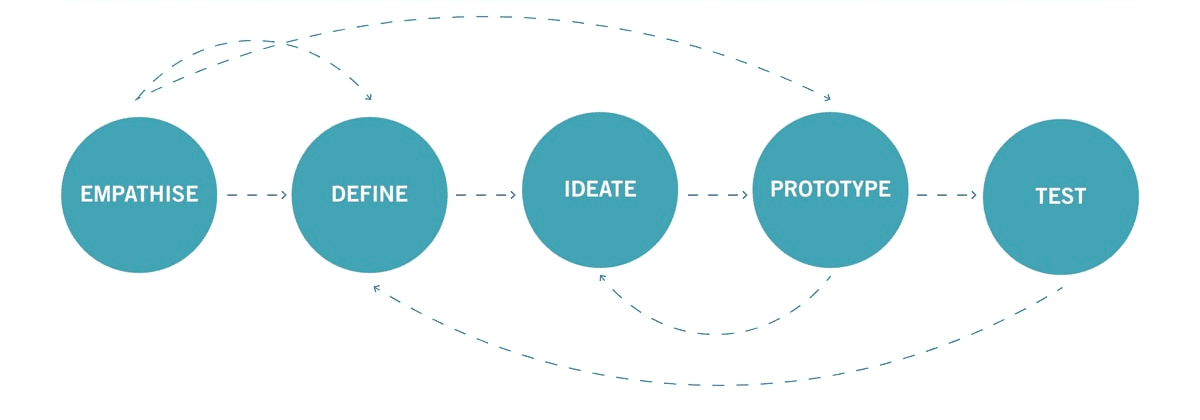
Define User Personas and Use Cases:
a. Created user personas representing different types of community managers and members, such as admins, moderators, and active participants.
b. Identified key use cases and user journeys to ensure the dashboard caters to the needs of various user roles.
Information Architecture and Wireframing:
a. Developed a hierarchical information architecture to organize community-related features and functionalities.
b. Created low-fidelity wireframes to outline the layout and structure of the dashboard, focusing on usability and task flow.
Visual Design:
a. Defined a visual language consistent with Slack's branding while emphasizing usability and accessibility.
b. Utilized a clean and intuitive design approach, employing clear typography, color schemes, and iconography.
c. Conducted iterative design reviews and gathered feedback from stakeholders to refine the visual aspects.
Prototyping and User Testing:
a. Created interactive prototypes to simulate the dashboard experience and conducted usability tests with representative users.
b. Gathered feedback on usability, functionality, and overall user satisfaction to iteratively improve the design.
Development and Implementation:
a. Collaborated closely with developers to ensure the seamless integration of design elements into the existing Slack infrastructure.
b. Followed an agile development process, continuously testing and refining features before deployment.
Conclusion
The Slack Community Dashboard project aimed to enhance the community management experience within Slack workspaces. By following a comprehensive UX design process, we achieved the following outcomes:
Improved User Experience: The new dashboard provides an intuitive and user-friendly interface, allowing community managers to efficiently perform tasks and engage with community members.
Enhanced Community Engagement: Through thoughtful design decisions, such as prominent discussion threads, event notifications, and member activity tracking, the dashboard encourages active participation and fosters a sense of community.
Streamlined Community Management: By consolidating essential community management functionalities, such as member onboarding, content moderation, and analytics, into a single dashboard, community managers can efficiently oversee and nurture their communities.